Best Expense Tracker for Contractors: What Actually Matters When You're Choosing One

Best Expense Tracker for Contractors: What Actually Matters When You're Choosing One
The best expense tracker for contractors is one that logs job costs by project, captures mileage automatically, and lets you snap a photo of a receipt before it ends up crumpled in your truck. Look for tools built around irregular income and multiple job sites, not generic personal budgeting apps. If it can't tie an expense to a specific job in a few taps, it's going to slow you down instead of saving you time.
Most expense trackers are built for people with one paycheck and a handful of recurring bills. Contractors don't work that way. You might have three active jobs, a mix of cash and card purchases, and material costs that need to land against a specific client invoice instead of a monthly budget category.
That's why the right tool for a contractor looks a bit different from a general personal finance app. You want expense capture that's fast enough to use standing in a parking lot at a supply store, and reporting that breaks costs down by job rather than by calendar month. Mileage tracking matters too, since driving between job sites is one of the most commonly under-claimed deductions contractors have.
Price matters, but not as much as whether the app fits how you actually work. A cheaper tool that takes five minutes to log a receipt costs you more in the long run than a slightly pricier one that takes fifteen seconds. Before you commit to anything, it helps to know how to track job costs by project, not just by month, since that distinction affects almost every other decision on this list.
What to Look for in an Expense Tracker as a Contractor
Start with how the app handles multiple active jobs. If you're running two or three projects at once, you need a way to tag each expense to the right one without extra steps. Apps that only support a single running total will force you to sort everything out later, usually at tax time, which defeats the purpose of tracking in the first place.
Receipt capture speed matters more than people expect. If snapping a photo and categorizing it takes more than a few seconds, you'll skip it half the time, and gaps in your records are worse than no system at all.
Mileage and Job Cost Tracking Features That Matter
Mileage is one of the easiest deductions to miss and one of the easiest to overstate if you're not tracking it consistently. A tracker that logs trips automatically, rather than asking you to remember to hit "start" every time you get in the truck, removes the guesswork. If you've never sat down and worked out what you're actually leaving on the table, it's worth reading through mileage deductions contractors miss most often before you settle on a tool.
Job costing is the other piece. You want to see, at a glance, what a specific project has cost you so far in materials, mileage, and any subcontracted work. That number should be available any day of the month, not just after you've exported a spreadsheet and done the math yourself.
Pricing and Ease of Setup for Solo Contractors
If you're running your own bookkeeping without an accountant on staff, setup time matters. A tool that requires a long onboarding process before it's usable isn't a good fit if you need to start logging expenses this week. Look for something you can set up in one sitting, connect to a bank account or card, and start using immediately.
Cost should be weighed against what the app replaces. If it saves you from paying a bookkeeper to reconstruct your job costs at tax time, a monthly fee is easy to justify. If you're already comfortable with a lighter system, setting up a simple bookkeeping system as a solo contractor might get you most of the way there without a dedicated app at all.
FAQ
Do I need a dedicated expense tracker if I already use accounting software? Not necessarily. Some accounting software includes expense tracking, but many contractors find dedicated apps faster for day-to-day receipt capture and mileage logging, especially in the field.
How often should I log expenses to stay on top of job costs? Daily is ideal, especially on active jobs. Waiting until the end of the month makes it much harder to remember which receipt belonged to which project.
Can I track expenses for multiple jobs at once with one app? Yes, as long as the app supports tagging or categorizing expenses by project rather than lumping everything into one general ledger.
Is mileage tracking worth it if I only drive short distances between jobs? Short trips add up over a year. Even a few miles a day between job sites can add up to a meaningful deduction by tax season.
What's the biggest mistake contractors make when choosing an expense tracker? Picking a tool built for personal budgeting instead of project-based work, then trying to force job costs into categories that weren't designed for it.
Ready to simplify your tracking?
Start managing your project expenses with precision. Join hundreds of teams using our simple yet powerful tracker.
Related Articles
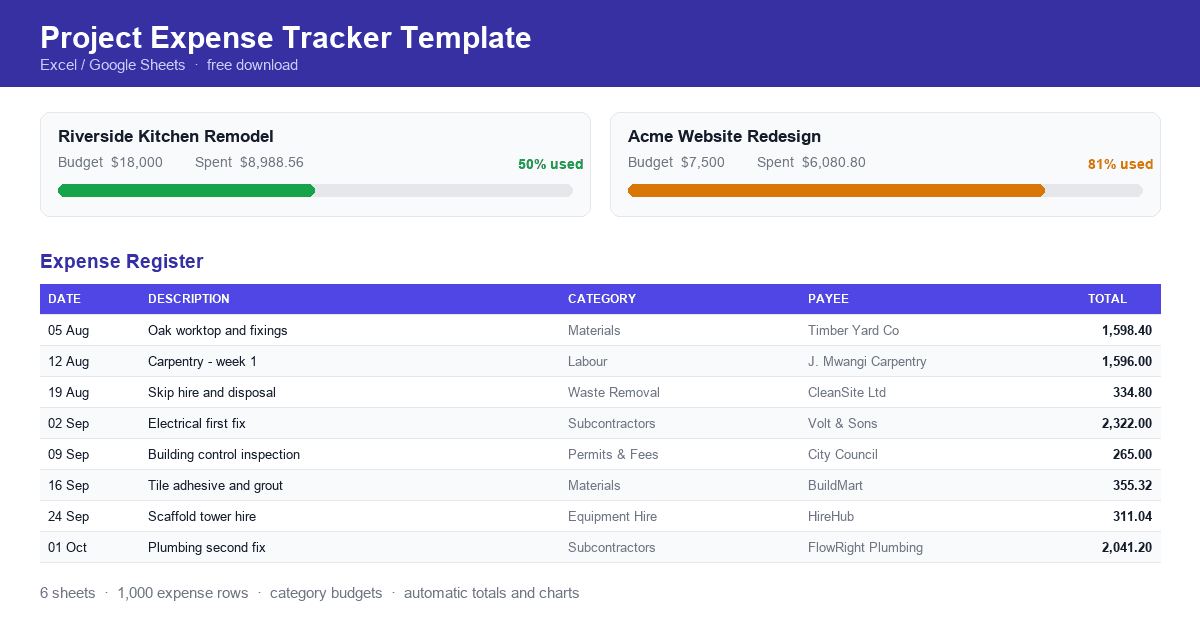
Project Expense Tracker Template
A free project expense tracker template for contractors, freelancers and project managers. Record expenses, allocate category budgets and see spending against budget automatically. Download the spreadsheet and start tracking today.
Expense Reports by Department or Project: How to Structure Them
How to structure expense reports by department or project, covering what each view answers, which elements make a report usable, and how to record expenses so both views are available.
How Finance Teams Can Collaborate With Budget Owners on Spend
How finance teams and budget owners can work from the same spending picture, covering why finance sees variances late, giving budget owners live visibility, and agreeing categories and thresholds in advance.