Project Expense Tracker Template
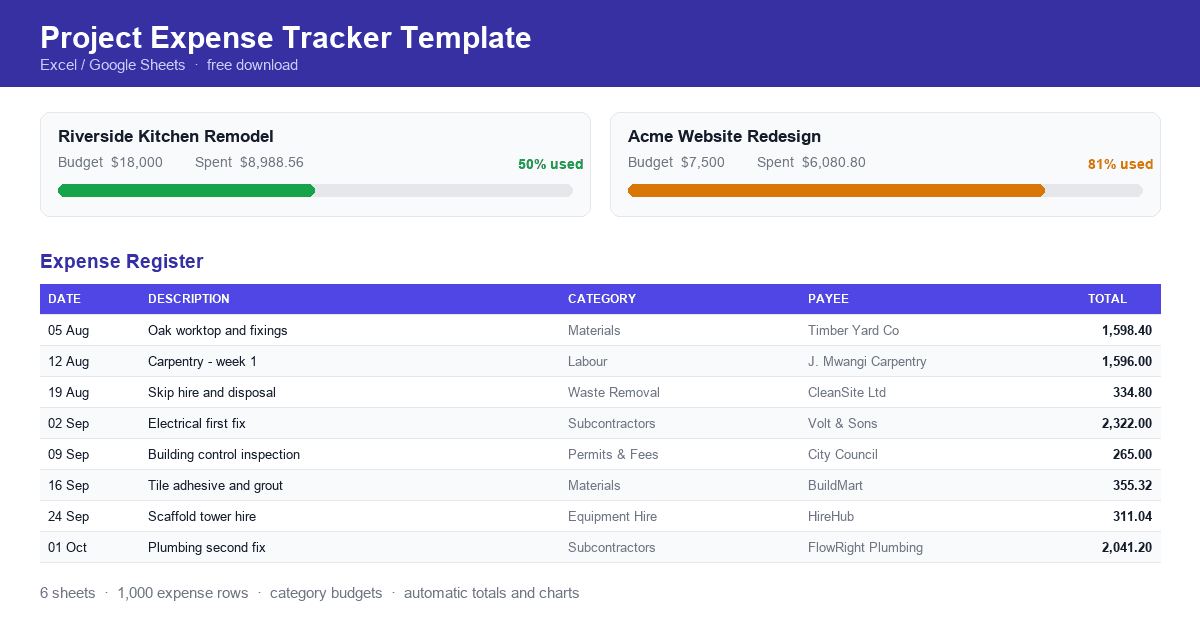
Most projects do not fail because of one enormous unexpected cost. They fail because of forty small ones nobody added up until the end. A skip hire here, an extra box of tiles there, a subcontractor invoice that arrived three weeks late — each defensible on its own, and collectively the reason the job finished eleven percent over budget.
The fix is unglamorous: write every cost down somewhere that totals itself, and look at it weekly. If you do not yet have a system for that, this is the fastest way to start.
Download the Project Expense Tracker Template — a free Excel workbook that works in Excel, Google Sheets and LibreOffice. No sign-up, no account, no connection to anything.
Why project expenses get away from you
Three problems show up again and again, whatever the industry.
Costs live in too many places. Some are on card statements, some on crumpled receipts in a van, some in a supplier's email. Nothing adds up because nothing is in the same place.
Nobody knows the running total. A budget you set in month one and never compare against is a wish, not a control. By the time the overspend is obvious, the money is already gone. We wrote about the mechanics of this in why projects go over budget and how to prevent it.
Expenses are not separated by project. If you are running three jobs at once, one shared pot of expenses tells you almost nothing useful about any of them.
A project expense tracking spreadsheet solves all three, provided it does the arithmetic for you.
What is a project expense tracker template?
A project expense tracker template is a pre-built spreadsheet for recording what a project spends, organised so the totals, budget comparisons and category breakdowns calculate themselves. You type the expense; the summaries update.
It is a good fit if you are:
- A contractor or builder tracking materials, labour and subcontractors across several jobs
- A freelancer or consultant keeping billable and reimbursable costs separate per client
- A small business owner who wants a project cost tracking template without buying software
- A project manager who needs a defensible record of where a budget went
- Someone managing a personal project — a renovation, an event, a move
The point of a template rather than a blank sheet is that the formulas, dropdowns and budget warnings already exist. You are not designing a system, you are filling one in.
What the template includes
Six sheets, each doing one job.
Getting Started
Setup steps, an explanation of every calculation, and a colour legend showing which cells are yours to type in and which contain formulas. It also explains how to clear the sample data and how to switch the currency away from US dollars.
Project Overview
One row per project, up to twenty. You enter the project name, client, status, start and end dates, the budget, and a budget alert threshold. The workbook then calculates total expenses, remaining budget, percentage of budget used, how many expenses are logged, and a plain-English budget health reading — on track, near limit, or over budget. A totals row sums every project together.
Expense Register
The sheet you will actually live in: a filterable table with a thousand rows ready to go. Each expense records date, description, category, merchant or payee, quantity, unit cost, tax amount, currency, exchange rate, payment method, payment status, a receipt URL or reference, and notes. The line total and the base-currency amount are calculated.
Dropdowns cover project, category, payment method, payment status and currency. Dates and amounts are validated, and if you start a row but leave out something required, the missing cell turns red.
Budget Tracking
Optional category-level allocations within a project's budget — five thousand for materials, four thousand two hundred for labour, and so on. Actual spend per category is pulled from the register automatically, with variance, percentage used and remaining shown alongside. An allocation check warns you if your category allocations add up to more than the project budget, because splitting a budget is not the same as increasing it.
Expense Summary
Headline figures — total spend, expenses logged, average expense, total budgeted, budget remaining, and how much is still unpaid. Below that, breakdowns by category and by project, a twelve-month table, and two charts. Nothing here needs typing except the reporting year.
Lists
The dropdown sources. Change the categories to match your trade and every dropdown follows.
Two sample projects and fourteen sample expenses come pre-filled so the charts and totals mean something the moment you open the file. Every sample expense ID starts with SMP-, so they are easy to find and clear out.
Benefits of tracking this way
Everything lands in one place. One row per cost, one file per set of projects. The receipt reference column means the paper trail is findable without keeping the paper.
You see the overspend coming. Percentage of budget used updates on every entry, and the budget health column flips to "near limit" when you cross your own threshold — not after you have blown through it.
Surprises become visible early. When spending is split by category, an overrun in one area stands out while the project as a whole still looks fine. That is the warning you can act on.
Multi-currency work still totals correctly. Expenses can be recorded in their original currency with an exchange rate, and every summary adds up the converted amount.
Less manual effort. No running totals by hand, no rebuilding a summary each month.
Who should use it
Contractors and construction professionals. Materials, labour, subcontractors, equipment hire, permits and waste removal are already in the category list. Per-category allocations tell you whether the materials budget is the problem or the labour budget is.
Freelancers and consultants. Keep each client engagement as its own project. The payment status column separates what you have paid from what you will be reimbursed for — useful at invoicing time.
Small business owners. Run several jobs side by side without buying anything. The overview row shows all projects at once.
Project managers. The register is an auditable record: who was paid, when, for what, against which budget line, with a receipt reference.
Personal projects. A kitchen renovation or a wedding behaves exactly like a small construction project, and the same budget discipline applies. Our post on project expenses with real examples covers the cost types worth separating.
How to use the project expense tracker template
- Download the workbook. Get the template here, then open it in Excel, or upload it to Google Drive and open with Google Sheets.
- Read the legend. White cells with a border are yours. Grey cells are formulas — typing over one breaks that column.
- Add your projects. On Project Overview, replace the two sample rows. Name, start date and budget are required. Names typed here feed every project dropdown, so keep them consistent.
- Clear the sample expenses. On the Expense Register, select the rows whose IDs start
SMP-and clear their contents. Clear, do not delete the rows, so the table keeps its formulas and dropdowns. - Record expenses as they happen. One row each. For a single-figure cost, leave quantity blank or enter 1 and put the amount in unit cost. Add the tax separately if you need to reclaim it.
- Allocate category budgets if useful. On Budget Tracking, split each project's budget across categories and watch the allocation check.
- Review weekly. Open Project Overview, read the budget health column, and check Expense Summary for the category that is drifting. Weekly beats monthly — more detail in how to track project expenses effectively.
Spreadsheet template or the app?
The template is genuinely useful and genuinely limited. Both are worth being honest about.
Stick with the spreadsheet when you are running one or two projects, you are the only person entering costs, you are happy typing expenses at a desk, and you want something that works offline in a file you own.
Consider the Project Expense Tracker app when any of these start to hurt:
- Receipts pile up. The app scans a receipt with your phone camera and reads the amount and line items off it, instead of you typing them.
- Someone else needs in. You can invite people to a project and everyone sees the same numbers, rather than emailing versions of a file around. We covered why that matters in five ways to improve team collaboration on project finances.
- You are away from the desk. Expenses get logged on site, on iOS or Android, at the moment the money is spent — which is when records are accurate.
- Someone wants a report. Exports to PDF and CSV, rather than formatting a spreadsheet for a client.
- Clients ask for visibility. A project can be shared with a read-only public link.
- Costs repeat. Recurring expenses can be set up once instead of re-entered.
- You want to be told, not to check. Budget threshold alerts arrive as notifications when a project crosses the line you set.
A reasonable path is to start with the template, and move when the admin of maintaining it costs more than the tool would.
Frequently asked questions
What is a project expense tracker template?
A spreadsheet pre-built for recording project costs, with formulas that total spending, compare it against a budget, and break it down by category and project — so you record expenses rather than maintain arithmetic.
Can I use a spreadsheet to track project expenses?
Yes, and for one or two projects it is often the right tool. A spreadsheet starts to struggle when several people need to enter costs at once, when receipts need capturing away from a desk, or when you need audit history of who changed what.
How do I track project expenses against a budget?
Record the budget once, record every expense against the same project name, and compare the two continuously rather than at the end. In this template that comparison is automatic: percentage of budget used and a budget health reading update with every row, and the alert threshold tells you when to pay attention.
Is a project expense tracker template suitable for contractors?
Yes — contracting is the clearest use case, because costs arrive from many suppliers across several jobs at once. Keep each job as its own project, use category allocations to separate materials from labour from subcontractors, and record a receipt reference against every row.
When should I move from a spreadsheet to an expense tracking app?
When the file becomes the bottleneck. Common triggers: more than a couple of active projects, a second person entering expenses, receipts that need capturing on site, or a client who wants reporting you would otherwise assemble by hand.
Does the template sync with the Project Expense Tracker app?
No. The workbook is deliberately standalone — it does not connect to the app or to any account, and nothing you type in it leaves the file. If you later move to the app, you re-enter or import your projects there.
Start tracking this week
Projects do not go over budget in one dramatic moment. They drift, quietly, while nobody is adding up. A spreadsheet you actually fill in beats an elegant system you abandon by week three.
Download the Project Expense Tracker Template and set up your first project in about ten minutes.
Explore the Project Expense Tracker app if you would rather scan receipts with your phone, share budgets with your team, and get alerts before a project crosses its limit.
Ready to simplify your tracking?
Start managing your project expenses with precision. Join hundreds of teams using our simple yet powerful tracker.
Related Articles
Expense Reports by Department or Project: How to Structure Them
How to structure expense reports by department or project, covering what each view answers, which elements make a report usable, and how to record expenses so both views are available.
How Finance Teams Can Collaborate With Budget Owners on Spend
How finance teams and budget owners can work from the same spending picture, covering why finance sees variances late, giving budget owners live visibility, and agreeing categories and thresholds in advance.
Why Budget Overruns Go Unnoticed Until It's Too Late
Why budget overruns stay hidden until projects finish, covering reporting lag, committed versus actual spend, category-level reporting, and comparing spend to project progress.