Project expenses: real examples and how to track them

What are Project Expenses?
Project expenses are any costs incurred specifically to complete a project. They can be straightforward, like purchasing software, or complex, like allocating a portion of office rent to a specific client project.
Successful project managers categorize these expenses into two main buckets: Direct Costs and Indirect Costs.
1. Direct Project Expenses
These are costs that can be directly attributed to a single project.
Labor Costs
The most significant direct cost for most projects. This includes the wages, benefits, and taxes paid to the employees working on the project.
- Example: A software developer spending 40 hours a week on the "Project Alpha" mobile app.
Materials and Equipment
Physical items or digital assets purchased specifically for the project.
- Example: Buying specialized sensors for a hardware prototype or purchasing stock photos for a marketing campaign.
Subcontractor Fees
Payments made to external consultants, freelancers, or agencies hired to help with specific project tasks.
- Example: Hiring a specialized security auditor for a one-time system review.
2. Indirect Project Expenses (Overhead)
These are costs that support the project but are shared across multiple projects or the entire organization.
Administrative Costs
The "cost of doing business" that isn't tied to a specific project.
- Example: Office supplies, legal fees, and accounting services.
Facilities and Utilities
The cost of maintaining the environment where work happens.
- Example: Rent, electricity, and high-speed internet.
Software Subscriptions
General tools used across all projects.
- Example: Slack for communication or Jira for general task management.
How to Track Them Effectively
Tracking these expenses manually in spreadsheets is a recipe for error. Here’s how to do it right:
1. Log as You Go
Don't wait until the end of the week. Use a mobile app to log receipts and labor hours the moment they occur.
2. Use Granular Categories
Instead of just "Materials," use "Software Licenses," "Hardware," and "Cloud Infrastructure." This level of detail helps you identify exactly where you’re overspending.
3. Automate Approvals
Set up a system where expenses above a certain threshold require manager approval. This prevents "expense surprises" at the end of the month.
4. Integrate with Your Project Dashboard
Your financial data shouldn't live in a vacuum. It should be visible right alongside your project timeline and milestones.
Conclusion
By understanding and accurately tracking both direct and indirect expenses, you can ensure your projects remain profitable and within budget. Ready to start tracking? Get started with Project Expense Tracker today.
Ready to simplify your tracking?
Start managing your project expenses with precision. Join hundreds of teams using our simple yet powerful tracker.
Related Articles
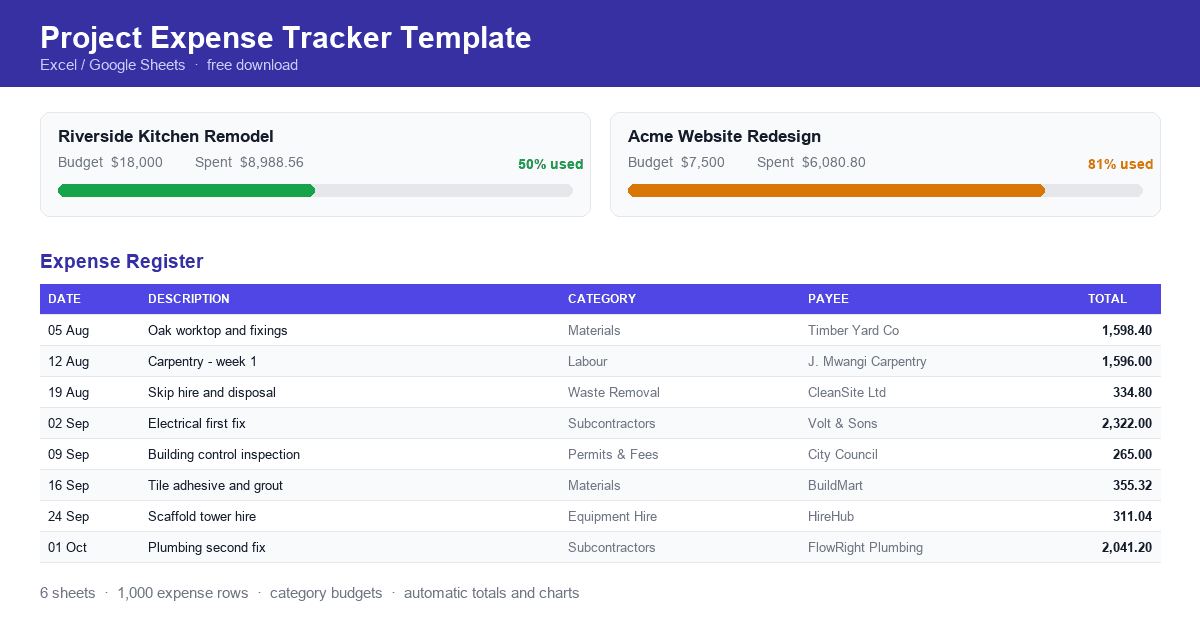
Project Expense Tracker Template
A free project expense tracker template for contractors, freelancers and project managers. Record expenses, allocate category budgets and see spending against budget automatically. Download the spreadsheet and start tracking today.
Why Budget Overruns Go Unnoticed Until It's Too Late
Why budget overruns stay hidden until projects finish, covering reporting lag, committed versus actual spend, category-level reporting, and comparing spend to project progress.
How Finance Teams Can Collaborate With Budget Owners on Spend
How finance teams and budget owners can work from the same spending picture, covering why finance sees variances late, giving budget owners live visibility, and agreeing categories and thresholds in advance.