Wedding Budget Spreadsheet Alternative: How to Pick the Right One

A wedding budget spreadsheet alternative is an app that replaces manual formulas and tabs with automatic totals, shared access for you and your partner, and expenses you can log from your phone. The right pick comes down to one question: do you want a wedding-specific planner with vendor checklists and guest lists, or a general budgeting tool that treats the wedding as a single project with its own budget? Most couples can start with a free tool. Paid tiers usually add live collaboration, reporting, and receipt storage.
The short version
Spreadsheets work until they don't. They break when two people edit at once, when you're standing in a venue trying to log a deposit, or when a formula silently returns the wrong total three months before the wedding. An app fixes those specific problems by syncing in real time, keeping a record of who entered what, and adding up categories for you.
There are two kinds of alternatives. Wedding-specific apps come with preloaded categories, vendor trackers, and sometimes guest management, which saves setup time but locks you into their structure. General expense trackers are more flexible and often cheaper, though you build the category list yourself. If you like the control a spreadsheet gave you but want the math and syncing handled, a general tracker is usually the better fit. If you want the whole planning workflow in one place, go wedding-specific. Either way, check that you can export your data as CSV before you commit, so leaving later isn't a rebuild.
What to look for in a wedding budget spreadsheet alternative
A few features matter more than the marketing pages suggest:
- Real-time sync and shared access. You and your partner, and maybe a parent, need to see the same numbers without emailing a file back and forth.
- Fast expense entry. Logging a payment should take seconds: amount, category, date, a note. If it's slower than typing into a cell, you won't keep up with it.
- Category tracking with running totals. The tool should show planned versus actual per category (venue, catering, attire, flowers) without you writing a SUMIF.
- Budget alerts. A nudge when a category hits 80 percent beats finding out you're 15 percent over after the fact.
- Receipt capture. Deposits and vendor invoices add up. Being able to attach a photo to each entry saves a scramble later.
- Export. CSV or PDF output means you can hand a clean summary to whoever is helping pay, and you're not trapped if you switch tools.
Wedding-specific apps vs. general expense trackers
Wedding apps like the ones that top the search results bundle budgeting with checklists, vendor contacts, and guest lists. That's convenient if you want one login for everything. The trade-off is rigidity. Their category structure is fixed, their reporting is basic, and some push vendor marketplaces at you.
General expense trackers skip the wedding-specific extras and focus on the money. You create a project, set a budget, define your own categories, and log spending against it. This suits couples who already think in terms of a budget and want accurate totals, charts, and history rather than a planning suite. It also tends to cost less, and the same tool keeps working after the wedding for a home renovation, a move, or a side business.
For a deeper walkthrough of running any budget this way, see how to track project expenses, which covers the same record-as-you-go habits that keep a wedding budget honest.
Free vs. paid: what you actually pay for
Free tiers on most tools cover a single budget, core categories, and basic charts, which is enough for a lot of weddings. Paid plans typically add multi-user collaboration, receipt or file storage, custom categories, and export formats beyond CSV. Before paying, list the two or three features you'd actually use. Live collaboration and receipt storage are the ones couples most often find worth it. Templates and vendor directories usually aren't, since you set those up once and move on.
How to move off your spreadsheet without losing the work
You don't have to abandon the spreadsheet you've already built. Use it as your import checklist:
- Finalize your category list in the sheet first. That's the part worth keeping.
- Recreate those categories in the app and set the total budget.
- Enter existing paid expenses in date order so your charts and totals reflect real history.
- Keep the spreadsheet as a read-only backup for a few weeks until you trust the app.
- Confirm the export works and produces a file you can actually read.
Using Project Expense Tracker as a spreadsheet alternative
Project Expense Tracker is a general project expense tool, so a wedding is just a project you create with its own budget and date range.
- Log each expense with an amount, category, date, a note, and a receipt photo. Every entry records who added it and when.
- Share it. Invite your partner or family, assign roles, and see entries appear in real time. Everyone is looking at the latest numbers.
- Organize spending with custom, color-coded categories and icons.
- See where the money goes with charts by category, by project, and by month, including daily spending bar charts and category donut charts.
- Get warned early by setting a per-project threshold, so you get an alert at 80 percent rather than a surprise at 110.
- Export a report as CSV or PDF in one click.
- Work from anywhere. There's an iPhone app and a web app, and data is cloud-synced across devices.
- Start without an account in guest mode, then upgrade to a full account later without losing your data. Google sign-in is supported.
It's free to start, with no card required. There are no wedding-specific templates, vendor databases, or guest list tools; you build the category structure yourself, which is the point if you want spreadsheet-style control without the formulas.
FAQ
Is an app really better than a Google Sheets wedding budget? For accuracy and shared editing, usually yes. A spreadsheet is fine for one person planning at a desk. An app is better when two people update it, when you log expenses on your phone, and when you want totals and alerts you don't have to maintain.
Can my partner and I use the same wedding budget at the same time? In tools with real-time collaboration, yes. Both people log in, see the same categories and totals, and changes show up as they're made. Check whether this is on the free tier or a paid feature.
What should a wedding budget include? Common categories are venue, catering and drinks, attire, photography and video, flowers and decor, music, stationery, rings, transport, and a contingency line of around 5 to 10 percent. Set a planned amount per category and track actual spending against it.
Do I need a wedding-specific app or will a general one work? A general expense tracker works well if you mainly want budget accuracy, categories, and reporting. Choose a wedding-specific app if you also want checklists, vendor management, and guest lists in the same place.
Can I get my data out if I stop using the tool? Only if it supports export. Look for CSV or PDF export before you commit, and do a test export early so you know the file is usable.
Ready to simplify your tracking?
Start managing your project expenses with precision. Join hundreds of teams using our simple yet powerful tracker.
Related Articles
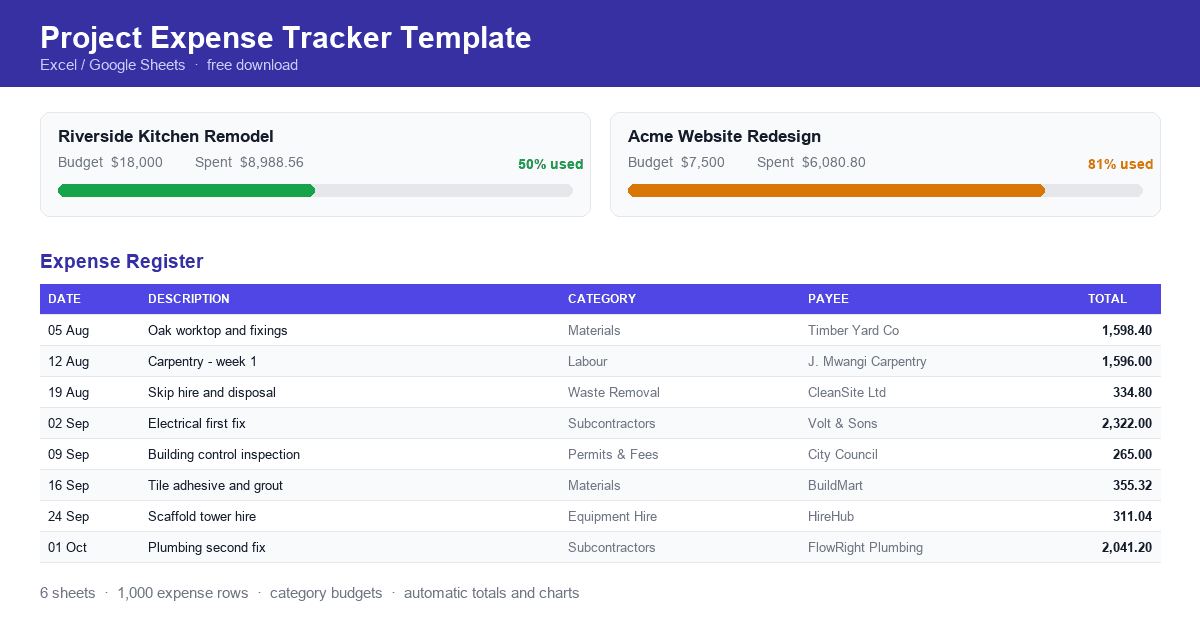
Project Expense Tracker Template
A free project expense tracker template for contractors, freelancers and project managers. Record expenses, allocate category budgets and see spending against budget automatically. Download the spreadsheet and start tracking today.
Expense Reports by Department or Project: How to Structure Them
How to structure expense reports by department or project, covering what each view answers, which elements make a report usable, and how to record expenses so both views are available.
How Finance Teams Can Collaborate With Budget Owners on Spend
How finance teams and budget owners can work from the same spending picture, covering why finance sees variances late, giving budget owners live visibility, and agreeing categories and thresholds in advance.